
Before you automate AI Scan, build the change record
A security program manager has already heard the rollout advice: map authority, read before writing, and separate enablement from execution. The harder implementation job is turning that advice into one durable artifact that another reviewer can audit without reading the automation code. This tutorial builds that artifact: an AI Scan change record with required fields, evidence at each transition, and an explicit stop rule when authority or eligibility is unknown.
That distinction matters for GitHub’s public-preview AI Scan controls. AI Scan is GitHub’s repository scanning capability. GitHub says a new repository_scan setting can be read or changed through existing organization- and repository-level Representational State Transfer Application Programming Interface (REST API) endpoints. A REST API is an HTTP interface that software uses to read or change a system. The announcement also documents important boundaries: organization settings can constrain repositories, enterprise policy can deny enablement with an HTTP 422 response, enabling the setting does not start a scan, on-demand scans consume Code Security AI credits, and GitHub Enterprise Server is not supported. GitHub Changelog, Nov. 13, 2026
The announcement establishes a configuration surface. It does not establish scan quality, coverage, cost-effectiveness, adoption, or improved security. The practical deliverable is therefore not another rollout checklist. It is a completed change record that connects baseline, decision, write response, readback, scan authorization, credit ownership, and stop conditions. Policy mapping appears here only as one required input to that record.
Implement the record from its first dependency
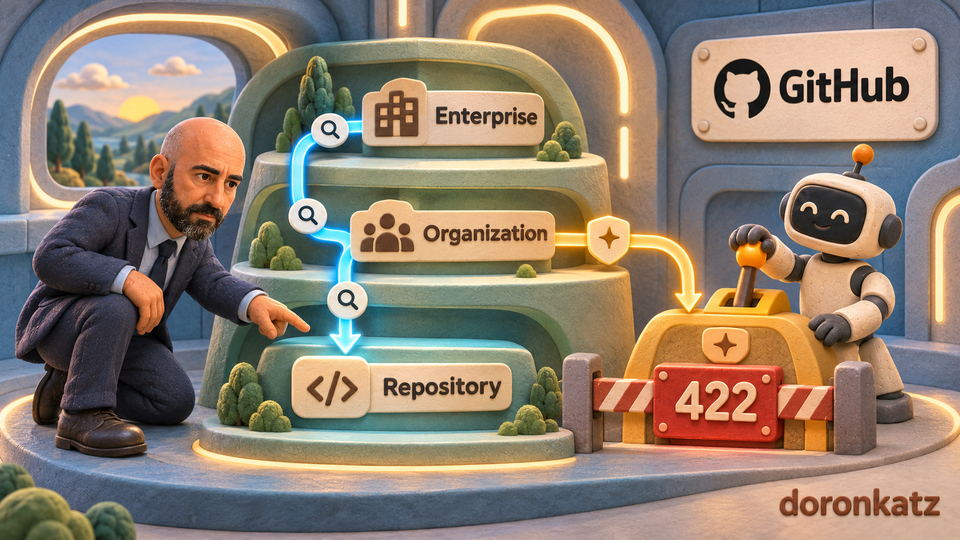
A policy boundary is the level where a rule can allow, constrain, or deny a change. In this case, the useful map has three levels: enterprise, organization, and repository.
For each level, name the policy owner, the people or service accounts allowed to read settings, and the actors allowed to request a change. Also record which rule can constrain the level below it. GitHub says that when an organization disables AI Scan for repositories, repositories cannot enable it. When the organization enables it, repositories inherit that state and can opt out individually. Enterprise owners must first allow AI Scan in enterprise policy. GitHub Changelog
This map turns a failed request into something interpretable. Without it, an operator may see a 422 response and retry, change credentials, or search for a workaround. With it, the operator can ask which higher-level policy denied the requested state and route the decision to the accountable owner.
“Public preview” is another boundary. It means early-access functionality whose availability or behavior may change. Verify the current hosting surface, plan or entitlement, repository type, and preview eligibility before assuming an endpoint applies. GitHub says the feature is available for public repositories owned by organizations and for private or internal repositories with GitHub Code Security or GitHub Advanced Security; it does not support GitHub Enterprise Server. Recheck the current documentation before acting because preview terms can change. GitHub Changelog
Use a read → decide → write → verify sequence
Automation compresses time between intent and impact. A four-stage sequence keeps the evidence visible.
1. Read the current state
Use the permitted GET operations to inventory organization and repository settings before proposing a change. Record the time, scope, actor, endpoint, and observed state. This creates a baseline and exposes differences without creating new ones.
Why it matters: a later response is only useful when you know what state existed beforehand. A successful write without a baseline cannot show whether the system changed, inherited a setting, or was already in the requested state.
2. Decide within a named scope
Define the smallest repository set that can answer the rollout question. Name the reviewer, policy owner, intended state, expected inheritance behavior, acceptable denial path, and stop condition. Separate eligibility from authorization: a repository may be technically eligible while policy still forbids the change.
Why it matters: “turn it on everywhere” hides several decisions inside one instruction. A limited scope makes it possible to review assumptions and stop without expanding an uncertain result.
3. Write once, then interpret the response
Issue the approved change only within that scope. Save the actor, endpoint, requested state, response, and reviewer reference. GitHub documents that enterprise policy can cause a 422 response for an attempted enablement. It also says that if a request changes both pr_scan and repository_scan and either change is blocked, neither setting changes. GitHub Changelog
Why it matters: a policy denial is evidence about authority, not a transient failure to erase with retries. Repeated writes can create noise while leaving the underlying decision unresolved.
4. Verify configuration and execution separately
Read the setting again after an accepted write. Then create a separate decision record for scan execution. GitHub explicitly says that turning on AI Scan for repositories does not start a scan. Users with write access still run scans on demand, and each scan consumes Code Security AI credits. GitHub Changelog
Why it matters: configuration success and scan execution answer different questions. A dashboard or script that merges them can report “enabled” as though work has been scanned. It can also obscure who owns credit consumption.
A change record you can reuse
Before a test, create a record with these fields:
- Surface and eligibility: hosting environment, plan or entitlement, repository type, and preview availability.
- Scope: the exact organizations and repositories included and excluded.
- Authority map: enterprise, organization, and repository policy owners.
- Baseline: current settings, read time, actor, and endpoint.
- Requested change: setting, intended state, reason, reviewer, and stop condition.
- Response: status, time, and any documented policy denial.
- Readback: state observed after the request.
- Execution decision: whether a scan is requested, by whom, and under which approval.
- Credits: the owner responsible for checking entitlement and usage.
- Rollback or stop rule: what evidence ends or reverses the test.
Copy this compact template into the approved system of record before the test:
Surface / eligibility:
Repositories in scope:
Repositories excluded:
Enterprise policy owner:
Organization policy owner:
Repository administrator:
Baseline read (time, actor, endpoint, state):
Requested change and reviewer:
Expected denial / inheritance behavior:
Response and readback:
Scan requested? (yes / no / unknown):
Scan approver and credit owner:
Stop or rollback condition:
If a field is unknown, leave it marked unknown and stop at read-only inventory. Do not turn a missing answer into an assumed permission.
Do not place tokens, credentials, or unnecessary response data in the record. Keep only the evidence needed to explain the decision and resulting state.
Hypothetical example: a repository request meets an organization rule
Suppose a repository administrator asks a platform team to enable repository_scan. This example is hypothetical; it does not describe a measured outcome.
The team first reads the enterprise, organization, and repository configuration. It records that the enterprise allows the feature, while the organization policy controls repository inheritance. The repository is within the documented surface, but the operator has not yet established whether the organization owner approves the requested state.
The team does not write. It routes the request to the organization policy owner with the baseline, proposed scope, expected inheritance behavior, scan-credit owner, and stop condition. Only after that review does it run a limited write. If the write returns the documented 422 denial path, the team records the response and stops. If the write is accepted, it reads the setting again. It still does not claim that a scan ran. Scan execution remains a separate, approved action.
The useful outcome of this process is not a promise of better security. It is a traceable answer to four questions: what was true, who decided, what changed, and what still has not happened.
Common mistakes
Treating preview availability as universal. Check the current supported surface and entitlement instead of inferring them from an announcement.
Assuming repository authority overrides higher policy. Map enterprise and organization constraints before asking a repository-level operator to act.
Retrying a policy denial. Preserve a documented 422 response and route it to the policy owner; do not turn governance into an error-retry loop.
Equating HTTP success with a completed scan. Read back the setting, then keep the scan request and its credit decision separate.
Ignoring credit ownership. GitHub says on-demand scans consume Code Security AI credits. Decide who checks entitlement and approves usage before scan execution.
The decision rule
Proceed to a limited test only when the supported surface, preview eligibility, policy authority, current state, expected denial behavior, scan-execution decision, and credit owner are documented. If any of those are unknown, stop at read-only inventory and current-documentation review.
That may feel slower than writing the script first. It is faster than trying to reconstruct authority and intent after automation has multiplied an ambiguous change.
Source boundary
This tutorial relies on GitHub’s Nov. 13 product announcement and its linked documentation surface. It makes no independent claim about detection quality, coverage, false positives, cost, adoption, or security outcomes.
Member discussion